From concept art to a clean GLB
An image can look perfect and still turn into a terrible 3D model. I’ve been working on a repeatable way to get from concept art to something I can actually use.
The question
How much cleanup can I automate without losing what made the artwork good?
What I tried
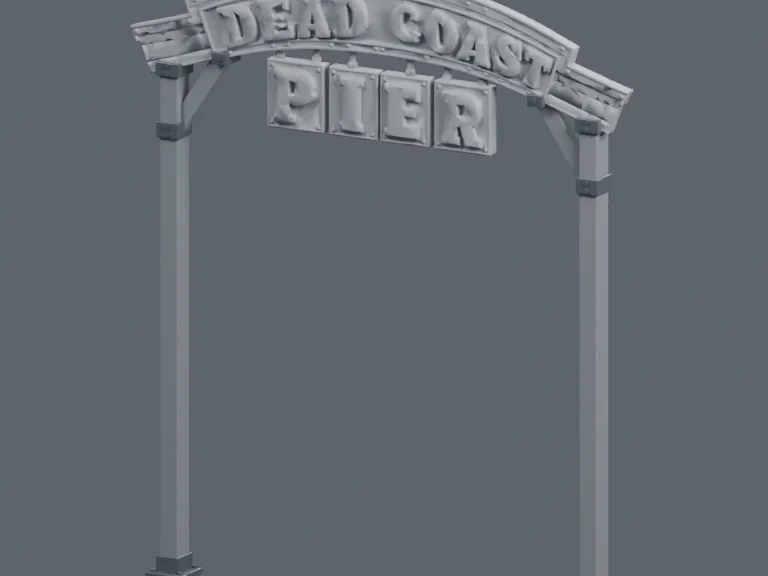
For the Dead Coast Pier sign, I used my original artwork, generated a model with Tripo, then assembled and refined the fittings and materials in Blender. The raw export stays untouched.
What it proves
The published World case study includes the sign’s model and its in-game placement. That proves this asset’s path through the pipeline, not that every export is automatically game-ready.
Where to go next
Read the process and compare the model with its game placement in the related project.
The problem
Generation gets me a starting point. I still need to check the silhouette, scale, materials, and how the pieces fit together.
The pipeline
Original artwork → generated model → preserved raw export → Blender assembly and material work → GLB inspection → a separate game integration check.
What passed
The pier sign has both an inspectable model and a documented place in the game. The case study lets you compare the object with the scene it was made for.
What still needs work
The checks repeat for every asset. A clean viewer render can still hide the wrong scale, excessive geometry, or materials that behave badly under game lighting.
What I learned
The useful automation is the part that leaves me time to make decisions. Somebody still has to decide whether the result belongs in the world.