WESTCOSE ORIGINALS / FLAGSHIP PROJECT
WestCose World.
A whole coast, built for the browser. An original world of skate culture, strange places, and things worth discovering.
Contents 8 chapters
A world in the browser
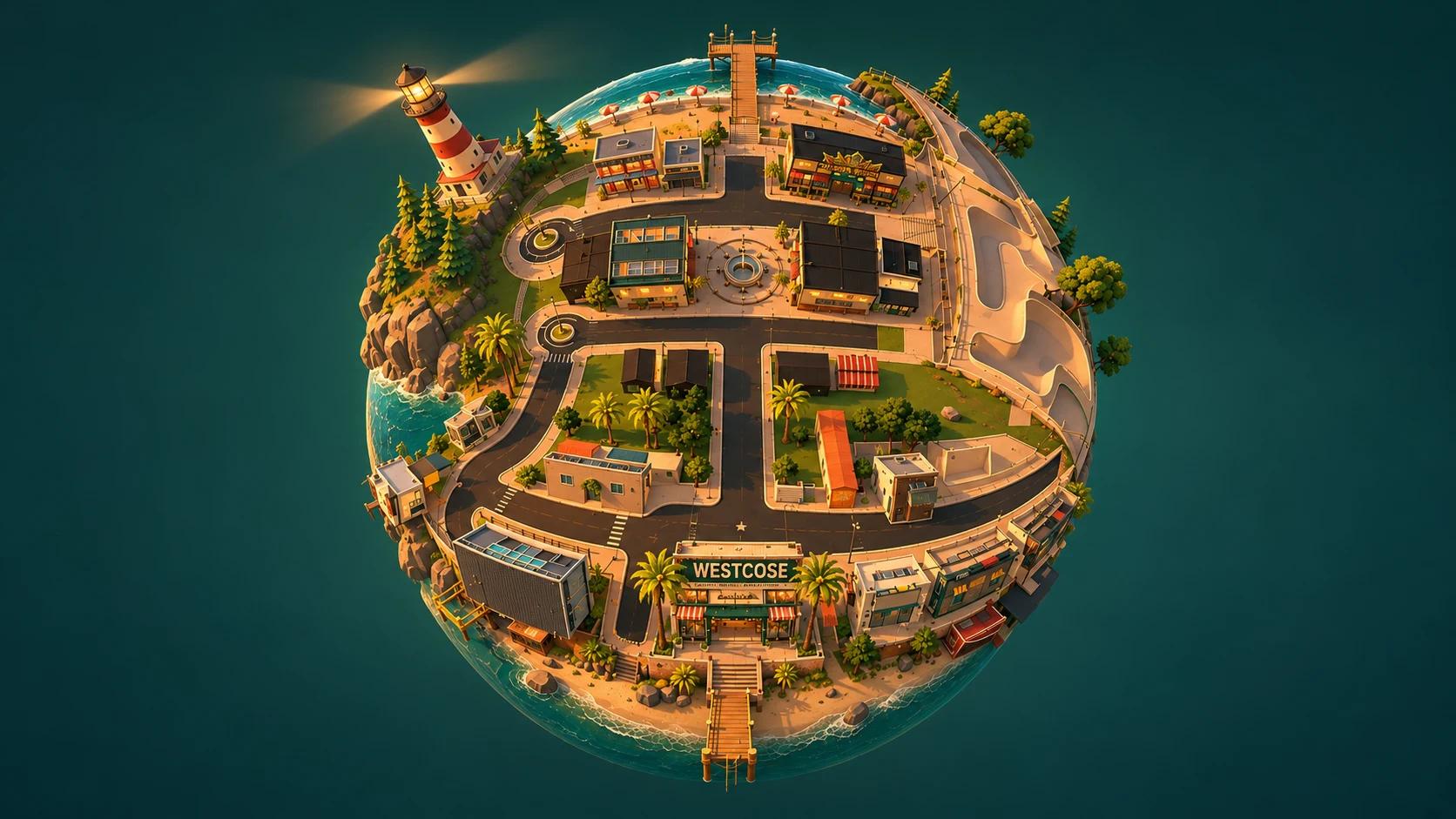
Start with a little planet. Step into a coastal town. Follow a street, find a skate spot, or take the long way to the water.
WestCose World brings the brand into a place you can inhabit. Walking, skating, fishing, enterable interiors, and survival games share a continuous coastal setting. The town has its own storefronts and artwork; the pier, lighthouse, caves, and industrial backroads give each journey a different character.
Next.js provides the application and interfaces. React Three Fiber connects React to the scene, while Three.js handles the cameras, geometry, materials, lighting, and animation. TypeScript carries the rules that make those pieces behave like one world.
How movement follows a small planet
The player’s up direction comes from the planet’s center. Movement is projected onto the local tangent plane, and the camera follows that changing frame. Authored map coordinates place roads, buildings, and activities on the sphere.
Terrain height, walkable surfaces, collision, steps, and camera clearance refer to shared world data. A road’s visible shape and the ground under the player therefore come from the same definition. Interiors and activities can take over the camera and input, then hand control back to exploration.
Artwork becomes a world
The visual identity is part of the environment: printed on shirts, fitted to decks, mounted on walls, and built into landmarks.
Coastal colors, worn signage, hand-drawn graphics, and compact, low-poly forms keep the world recognizably WestCose. The graphics retain their character as they move between a flat print, a wearable texture, and a physical place.
Step inside WestCose.
A place for the artwork to live. From the courtyard to the mural, the store brings the world’s clothing, boards, and coastal identity together.


One identity.
A whole collection.
The skull-wave mural anchors the room. Sea-green ink, warm sunset colors, brick, and timber connect the architecture to the original prints.
In the game, Loadout carries that identity into a focused selection flow: browse a department, preview the design, then equip it.
Explore the game interface ↗
Two assets, up close
Rotate the Dead Coast Pier sign and the Shop building. Switch to wireframe to see the geometry behind their silhouettes.
From a source graphic to a runtime asset
Shirt artwork is projected onto the actual torso and baked through its UV triangles. This preserves the chest and back placement without changing the character’s mesh, rig, or animation. Preview renders use the same prepared textures.
The Pier sign began with original WestCose artwork, translated into a dimensional sign through Higgsfield / Tripo H3.1. Blender work added the supports, fittings, materials, and lamps. The painted runtime version has 32,249 triangles, two materials, and a small seamless paint texture.
The Shop combines original graphics, architectural composition, and custom geometry with adapted, credited environment assets. Scale, pivots, materials, and texture atlases are prepared for the game. The model inspector uses those actual GLB exports.
Start, pause, and shop
A game’s interface belongs to its world. The same paper, paint, condensed type, and coastal artwork carry through the first frame and every return to the menu.
The opening broadcast
An eight-second broadcast sets the tone with an undead seagull and original artwork. The game loads underneath it. A skip action, reduced-motion preference, or playback failure releases the player into the loading and title sequence.
A title screen with a real world behind it
The planet remains live behind the title artwork. Condensed menu labels and yellow paper establish the primary action; smaller supporting lines explain the choices. Portrait layouts rearrange the composition for touch. Loading progress follows completed work, then the camera approaches the planet and hands off to the player.
Take Five and WestCose Loadout
Take Five keeps the moment the player left behind: a captured gameplay frame sits beneath the pause drawer. Loadout uses a larger character preview, separate apparel and deck departments, and an explicit equip action. Browsing and committing a choice are different steps.
Camera handoffs, pause frames, and focus
The title reveal and descent reuse the mounted world, renderer, and camera. The atmosphere changes with the camera mode rather than replacing the whole scene.
Pausing captures the rendered frame and suspends activity input and continuous world rendering. The drawer remains an ordinary accessible interface. Dialog focus stays with the active interface, Escape returns through the intended state, and closing restores the player’s context.
The broadcast is a prepared film with a bounded handoff: a late first frame, stall, or playback error does not indefinitely block the game. Sound follows the game’s opt-in preference. The portfolio film is silent.
Clothing and decks
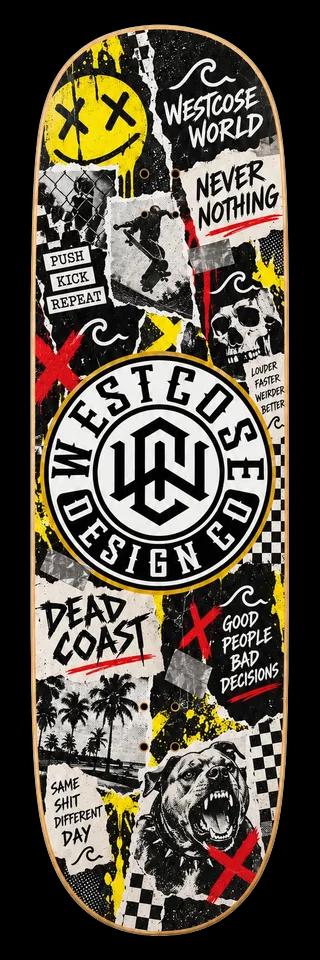
The artwork is wearable. Browse the real collection: 25 shirts across WestCose, Dead Coast, and Perks, plus 12 decks from WestCose and Dead Coast.
Art under your feet.
Collage / Never Nothing
A cut-and-paste skate graphic: torn paper, bold marks, and the Never Nothing attitude. Designed to read as a complete composition along the board.
Artwork from the actual game catalog. Choosing a deck here previews its graphic; it doesn’t change a game save.
Wear the coast.
Original front and back prints, shown on the actual game character. Pick a collection, choose a design, and turn it around.
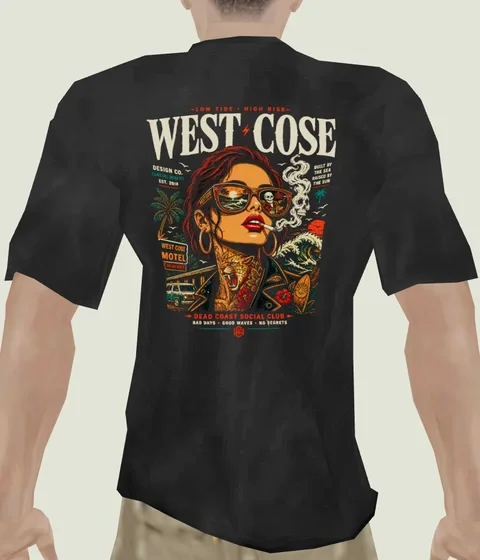
Actual character previews and original print artwork. Equipping and saving happen in the game.
Small chest graphics and larger back prints give each shirt a different read from the front and the follow camera. Decks use their own tall compositions, fitted to the board rather than treated as miniature posters. The selectors keep category, selected artwork, and the resulting preview together.
What happens when a player equips a design
The game distinguishes the previewed design from the equipped one. Clothing selection loads the complete texture before replacing the three torso materials together. A superseded request is cancelled or ignored; a failed load keeps the current outfit available for recovery.
Texture setup preserves the model’s UV orientation, wrapping, and color space. Replaced textures are released only after checking that another material is not still using them. Deck graphics follow their own catalog and material replacement path.
Equipped choices persist locally in the game. This portfolio exhibit uses independent React state and rendered previews; it does not read or write a visitor’s game save.
Zombies: two different places
The Grotto and Reclamation Center share a combat foundation. Their spaces, progression, and environmental threats make them feel like different survival games.
The Grotto / Black Tide
A sea cave turns into a compact survival arena. Every fifth round brings Black Tide: a warning, rising water, a flooded fight, and a drain phase. The dry ledge becomes a tactical refuge. Water is part of the rules, with the visible flood and damage boundary driven by the same definition.
Reclamation Center / the night shift
The facility is a larger progression space. Gates control the route, power changes what works, and perks, equipment, and furnace upgrades give earned points a purpose. Barricades, machinery, industrial rooms, and connecting yards create decisions about where to hold and when to move.
The clock-in sequence in the game
The story begins with workplace routine: arrive for the night shift, clock in, and sit through the safety film. Instructions, signs, equipment, and the layout of the facility carry the story into play. The drums found in the Grotto came from Reclamation, connecting the coast’s two survival spaces through the world’s lore.
Shared combat, map-specific rules
A shared TypeScript session owns rounds, enemies, damage, weapons, and interactions. Map adapters answer questions about floors, visibility, routes, collision, and usable objects. The Grotto adds flood rules; Reclamation adds facility progression, power, and Gary.
Those same systems can run in development labs. A lab can put a player, target, or encounter into a known state without rebuilding the rules as a separate demo. Planned connective spaces in the lore are kept distinct from currently traversable routes.
Weapons and Gary
Combat is a conversation between simulation and presentation: a shot has to land at the right time, feel readable, and obey the same rules the player can see.
The arsenal, up close.
Recognizable silhouettes meet original coastal oddities. Explore the AK-47, MP5, and two WestCose wonder weapons through studio renders of the current game models.
AK-47
Wood furniture, dark steel, and a curved magazine give the wall rifle an immediately readable profile. This is the world model; the first-person AKM has its own authored model and reload.
MP5
A compact silhouette with an integrated suppressor and open sights. The handless pickup model lets the shape and material work stand on their own.
Riptide
An original WestCose ray weapon with its own geometry, materials, and paint atlas. Its projectile behavior gives it a different role from the conventional arsenal.
Furnace upgrade King Tide
The Blowhole
A pressure weapon built around a broad, distinctive muzzle. The base version carries two charges; its Furnace upgrade becomes The Tsunami with four.
Furnace upgrade The Tsunami
Aim transitions, recoil, ammunition, and reload timing live alongside authored first-person animation. Equipment and upgrades extend the same system rather than bypassing it.
Aiming, reloads, markers, and hit detection
Weapon state tracks actions and their timing. Animation markers coordinate visible events with ammunition changes and effects; empty and partial reloads can follow different paths. Recoil and aiming affect the view, while the shot is resolved by the combat simulation.
Hit testing checks target regions and environmental occlusion. Presentation consumes the resulting events for muzzle flashes, impacts, sound, and reactions. The Arsenal and Damage Range make framing, action timing, and damage repeatable to inspect.
Meet Gary. He works here.
A high-visibility shirt, name badge, oversized silhouette, and pipe wrench make Gary part of the facility’s workforce. His design adapts the civilian zombie into a character with a very different presence.
He arrives from the sludge in the first round, outside the ordinary zombie quota. His entrance lets the sludge stir, the body climb into view, and the wrench meet his palm before pursuit begins. Calm Gary is slow and readable. Provoking him brings a scream, faster pursuit, running attacks, and a ground slam.
Gary’s current model and silhouette
Gary’s current behavior, from arrival to return
The current director schedules his first arrival six seconds into the session. Dedicated states handle emerging, calm pursuit, screaming, rage, swings, slams, staggering, defeat, and sinking. Attacks use their clips’ timing markers; hit spacing and a grace period after the scream prevent unavoidable chains.
From round six, an enraged Gary can accelerate nearby zombies. Beating him sends him back toward the sludge; he sinks and stays away for two rounds before returning. The map provides reachable sludge points and navigation, while the director owns his state and timing.
Development labs and World Builder
The project includes the tools needed to make it. Purpose-built Next.js interfaces and Three.js scenes turn difficult visual problems into things that can be inspected, repeated, and improved.
A lab for each question
Arsenal isolates weapons and their actions. Damage Range checks hit regions and distance. Zombie Animation exposes movement and reactions. Barricades exercises tearing and traversal. Effects & Audio connects feedback to events. Reclamation reproduces facility systems and encounters. Hound Look compares enemy presentation, and the Skater lab keeps the character, board, and animation in view together.
These are working development interfaces, with the game’s actual assets and shared systems. They shorten the loop between changing a rule, seeing the result, and checking the same situation again.
World Builder
The Builder makes world composition an interactive task. An asset library, scene viewport, and selected-item inspector work together, with separate Free Roam and Reclamation workspaces. Numerical controls sit alongside direct manipulation so a placement can be both intuitive and exact.
- Import and prepare
Bring in PNG, JPEG, or WebP artwork, or a self-contained static GLB. Model preparation normalizes size and the base pivot. Compare the original with the prepared result before adding it to the library.
- Place and refine
Choose a prop or print, place it on a surface, then move, rotate, or scale it. Use snapping, dimensions, duplicate, lock, and undo/redo. Objects placed on an added support follow that support when it moves.
- Walk through and check
Inspect from player height. Review collision shapes and reserved clearances around entrances, interactions, routes, and gameplay machinery. Scene sampling exposes draw calls, triangles, textures, and frame intervals.
- Save, review, and apply
Save an immutable named version. Review that exact version and resolve blocking issues before applying it to the local game. Recovery drafts and previous versions preserve a way back.
BUILDER → GAME
- Draft & assetsPrepared revisions, placements, transforms, and support relationships.
- Saved version & reviewSurface, asset, collision, and gameplay checks against a specific version.
- Applied game layerA compiled manifest and prepared files, included in the next production build.
Publication safeguards and recovery
Applying a layout updates the local game’s decoration layer; deployment is a separate step. Protected buildings and gameplay machinery stay outside ordinary prop editing. Missing assets, invalid supports, or blocked required clearances prevent application.
Free Roam and Reclamation use different collision and navigation contracts. Reclamation validates player and enemy occupancy, shots, and representative routes. Free Roam checks movement, camera clearance, support, and overhead limits.
Saved versions are immutable. Draft recovery is separate, simultaneous changes are reported as conflicts, and failed application preserves the last working output. A production prebuild check verifies the applied files and their dependencies.
Labs, Builder, and authoring APIs are local development tools. This case study presents their real captures and workflow; those authoring routes are excluded from normal production.
How it works
A clear boundary between the application, simulation, world data, and rendered scene lets the project grow without tying every feature to the main game loop.
APPLICATION → SIMULATION → PRESENTATION
- Next.js + ReactRoutes, menus, Loadout, preferences, labs, and Builder controls.
- TypeScript systemsInput, movement, combat, progression, map adapters, and persistent choices.
- R3F + Three.jsScene composition, cameras, materials, animation, effects, and lighting.
One source of truth for the place
World definitions describe the terrain and authored surfaces used by rendering and collision. Activity and map adapters translate those definitions into the questions a simulation needs to ask: where an actor can stand, what a ray hits, or whether an interaction is reachable.
Rules first, visible consequences second
The combat session does not depend on React or the DOM. It advances state and emits events; the scene turns those events into poses, effects, and audio. Animation playback follows action states and markers, including root motion where an entrance or attack needs physical travel.
Assets, resource lifetime, and persistence
Prepared GLB models, texture atlases, material definitions, and authored animation data enter through focused loaders. Repeated environment props can share prepared assets and be batched into local cells. Replacement and cleanup paths account for shared textures and GPU resources.
Local preferences and equipment choices are separate from live session state. Builder recovery drafts, immutable saved versions, prepared asset revisions, and applied manifests have distinct responsibilities. The portfolio packages its own selected media, so it does not depend on a neighboring development checkout in production.
How the work is validated
Repeatable gameplay fixtures and development labs cover behaviors that are difficult to inspect during an ordinary run. Automated checks complement visual review: geometry and collision validation, action-state tests, browser interaction checks, and production validation of applied Builder layouts.
This case study was mapped with Graphify, then checked against current source. The source snapshot is a85ea165ea11. New captures show the current title, menus, labs, and Builder; asset and gameplay review captures document their individual development passes.
Credits and current status
WestCose World is an actively developed project. The playable systems and authoring tools shown here are implemented; art, performance, gameplay balance, and release preparation continue. The repository is private.
- WestCose: world concept, brand artwork, clothing and deck graphics, interface design, environment composition, game systems, labs, and Builder integration.
- Generated and assembled work: the Pier sign uses Higgsfield / Tripo H3.1 with Blender assembly and refinement. The opening film uses GPT Image 2.5 imagery and Kling 3.0 Pro footage, composed with layered animation; its source production also uses Seed Audio TTS.
- Shop environment: adapted Urban, Office, and Plants by valsekamerplant (CC0); PSX Building Kit Free by heyheythere (CC BY 4.0), with modified scale, pivots, composition, materials, and atlases; selected Elegant Crow geometry with original replacement imagery (CC0); and Screaming Brain Studios surface textures (CC0). No endorsement implied.
- Civilian zombie and Gary: adapted from “zombie” by Pixelhouse (CC BY 3.0). WestCose changed clothing, anatomy, materials, and rigging; Gary adds original hi-vis clothing, badge, hair, and wrench, with para / MakeHuman hands (CC0). No endorsement implied.
- Weapon models: the AK-47 studio render shows MaX3Dd’s AK 47 Assault Rifle (Sketchfab Standard), used as the game’s wall model. The separate first-person AKM uses Vlasov Daniil’s model and reload animation (CC BY 4.0). The MP5 model derives from TastyTony’s MP5SD (CC BY 4.0), with WestCose material and game adaptations; first-person studies also use Cransh’s animation and para / MakeHuman hands. Riptide and The Blowhole use original WestCose geometry, materials, and paint atlases. Studio lighting is for this portfolio; the model geometry and materials are unchanged. No endorsement implied.
- Hounds: the lab compares adaptations of LisbetBrioso’s Hell Hound and vinrax’s Arctic wolf PSX (CC BY 4.0), with WestCose repainting, rig fitting, and effects.
- Prototype reference dependencies: the skater derives from Tony Hawk’s Underground 2 (Neversoft / Activision). Combat research and adapted animation include Call of Duty: Black Ops (Treyarch / Activision) data. That proprietary data is separate from the licensed meshes above. These studies are shown as rendered captures; their raw character and weapon models are not included in this portfolio.
- Typography: Barlow Condensed by Jeremy Tribby (SIL Open Font License), Manrope, and IBM Plex Mono.
There is also a separate interactive planet experiment in the portfolio, exploring the spherical scene on its own.